
Private AI workshops for your company.
For an owner, the leadership team, or the whole staff. Work on a real problem from your own week, with help beside you, and leave with something useful. Tell me about your team and I will suggest a workshop that fits. In person in Austin, or online.

How a hands-on workshop runs
You bring one real task.
Something that comes back every week and gets rebuilt from scratch each time: preparing for meetings, a recurring report, the follow-ups after a call.
You build it yourself, with help beside you.
A short explanation, then working time. I move between tables. You use the AI tool you already have.
You leave with something that works.
A working tool or workflow, a skill applied to your own work, or a clear decision about where to start.
Three kinds of rooms
Pick by who will be in the room. You do not need to choose before getting in touch; tell me what is on your mind and I will suggest where to start.

Hands-on build workshops
Laptops open. Each person brings one real task from their own week, builds on it with help beside them, and leaves with something that works. Ninety minutes.
For business owners and their teams.
Ask about Put Your Business Knowledge to Work
You leave with a shared reference your team and your AI can both use.
Ask about Build One Useful AI Workflow
You leave with a repeatable method for one recurring task, tested on the real thing.
Ask about Build Your Personal AI Assistant
You leave with an assistant set up for meeting preparation, next steps and a daily brief.
Ask about Hand Off Your First Task to an AI Agent
You leave with one recurring task running under your own approval rules, and a short list of what an agent may and may not do for you.

Leadership sessions
No laptops needed. The owner and the people who run the business work through where AI fits, what it may and may not do, and what to start first. You leave with decisions written down. Ninety minutes.
For an owner and the leadership team.
Ask about See Where AI Could Help Your Business
You leave with a short list of places to start, drawn from your own week.
Ask about Set Your Team’s AI Direction
You leave with a one-page AI direction for the team: the rules, three first projects with a person responsible for each, and what to check in ninety days.
For IT and technical teams
For the people who run systems and build things inside the business. Technical and hands-on, on real files and real tools. Ninety minutes, or a half day for a team that wants to leave with it running.
For IT departments, developers and technical staff.
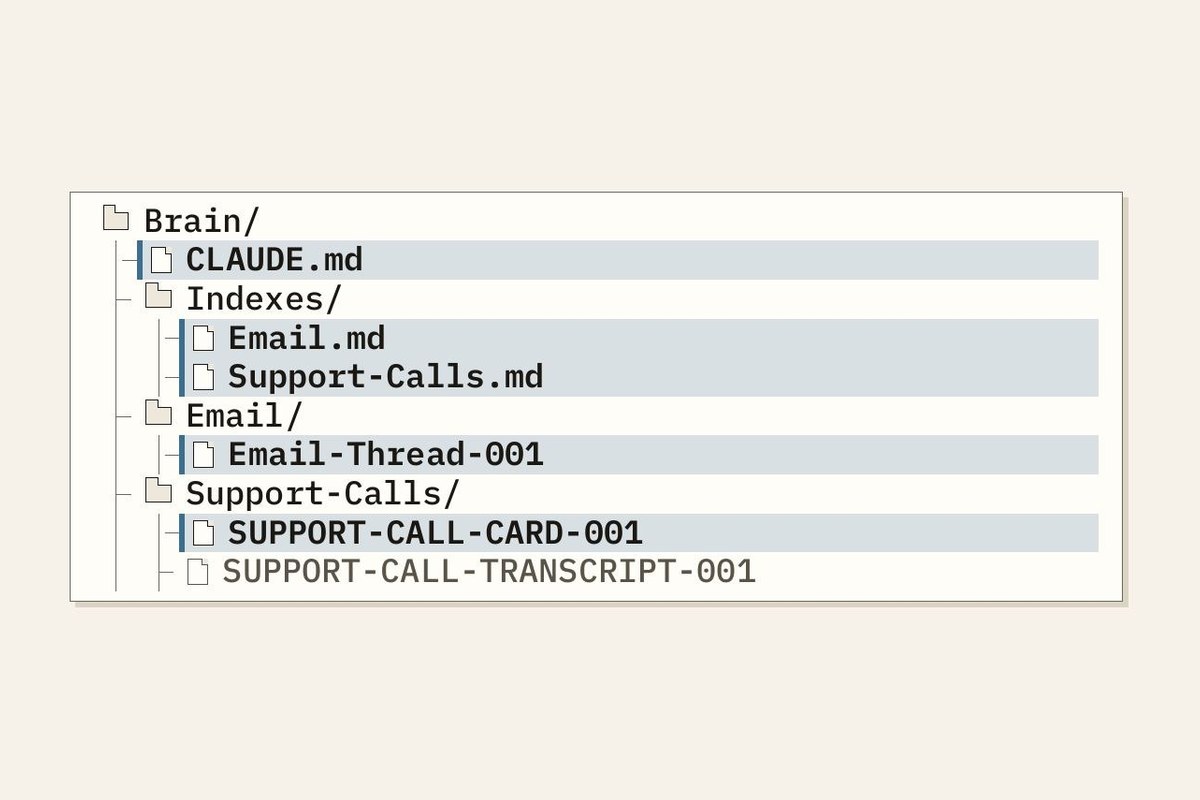
Ask about Give Your AI Agents a Map
You leave with a folder structure and instruction files an agent can find its way around, tested with two AI tools on your own files.
Looking for something specific in Austin?
Hands-on AI workshops in Austin
What the workshops are, who they are for, and how to bring one to your team.
AI training for executives and leadership teams
Ninety-minute leadership sessions that end with decisions written down.
In-person ChatGPT and Claude training
Hands-on time with the AI tool you already use, on your own work.
Workshop questions
Organizing a room for other businesses? Read the questions for group hosts.
Do we need to know a lot about AI first?
No. First-timers are welcome. Sessions are set to the room’s starting point, and if you have used ChatGPT a few times, that is plenty.
Which AI tool do you teach?
The one that fits the task and what you already have. The methods carry across ChatGPT, Claude, Copilot and Gemini.
Is my business information safe in a workshop?
It depends more on your plan than on the tool. On business plans (ChatGPT Business and Enterprise, Claude Team and Enterprise), OpenAI and Anthropic say they do not train their models on your content by default. On personal plans (ChatGPT Free, Plus and Pro; Claude Free, Pro and Max), your chats can be used for training: ChatGPT does this unless you turn off “Improve the model for everyone” under Settings > Data controls, and Claude asks you to choose, which you can check or change under Settings > Privacy. On any plan, don’t paste in passwords, card or bank numbers, Social Security numbers, health records, or client documents you’ve promised to keep confidential.
Two more things to know. A thumbs up or down on a response can send that whole conversation to the provider for training, even after you opt out on a personal plan. And a ChatGPT Temporary Chat or a Claude incognito chat isn’t used for training. I work with the tools you already use, and in a workshop I show you where these settings are. Checked against OpenAI’s and Anthropic’s policy pages in October 2026.
How long is a workshop?
Ninety minutes for most. The technical workshop can run as a half day for a team that wants to leave with it running.
Is this only for Austin?
No. I teach in person in Austin and online for groups elsewhere.
Do you teach online?
Yes. Online sessions are shaped for a call rather than a room, so the format and content differ from the in-person workshops. Tell me who would be on the call and what you want them to leave with, and I will suggest what fits.
What does it cost?
It depends on the group and the format. Send a message and I will ask a few questions first.
Where can I find hands-on AI workshops in Austin?
Open Door Learning, run by Jonathan Malkin in Austin, teaches ninety-minute hands-on AI workshops for business owners and their teams, on their own work. AI workshops in Austin
Who offers AI training for executives and leadership teams in Austin?
Jonathan Malkin of Open Door Learning teaches ninety-minute leadership sessions in Austin. No laptops needed; the team leaves with decisions written down, then builds hands-on in a workshop. AI training for executives
Where can I take an in-person ChatGPT or Claude class in Austin?
Open Door Learning teaches hands-on AI sessions in person in Austin, where you use ChatGPT, Claude, Copilot or Gemini on a real task of your own. In-person ChatGPT and Claude training
Are the free SBDC and SCORE AI classes enough?
Often, yes, as a first step. The Texas State University SBDC and SCORE Austin run free AI classes, and I teach one at the SBDC myself. A private workshop is for a team that wants to work on its own tasks and tools together. Free classes or a private workshop
Have a problem to work through?
We can work side by side to understand a business problem and build out a useful AI use case. You learn as we go.
Bring one into your business
Tell me which room sounds like yours, what you have tried so far, or who would be in it. I will suggest where to start.
I reply by email, usually within two business days.